Evaluating the Shopping UI Elements Kit for Modern E-Commerce Design
In the competitive landscape of digital commerce, the visual interface of an online store often dictates user retention and conversion rates. Designers and developers are constantly seeking resources that streamline the creation of intuitive, aesthetically pleasing interfaces without sacrificing quality or brand identity. The Shopping UI Elements Kit has emerged as a significant resource in this domain, offering a comprehensive collection of vector icons, dashboard templates, and widget collections tailored specifically for e-commerce applications. This article evaluates the utility, benefits, and limitations of such a kit to help you determine if it aligns with your specific project requirements.
Understanding the Scope of the Kit
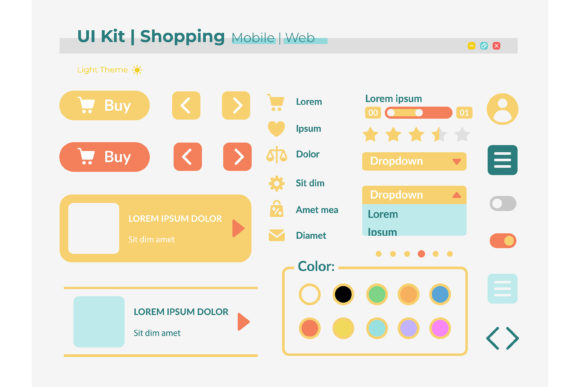
At its core, a Shopping UI Elements Kit is a curated library of pre-designed graphical assets intended to accelerate the web and mobile application design process. Unlike generic icon packs, these kits are context-specific, focusing on the unique needs of retail environments. The collection typically includes isolated vector icons representing buyer accounts, shopping carts, payment methods, and product categories. Furthermore, it often extends to complex structures like bar charts for analytics dashboards and full template layouts for mobile interfaces.
The technical versatility of these kits is a primary consideration for professionals. High-quality packages usually provide files in multiple formats, including JPG for quick previews, PNG for web-ready transparency, and vector formats like EPS, SVG, and AI. The inclusion of SVG and AI files is particularly critical, as it allows designers to scale elements infinitely without loss of resolution, ensuring crisp visuals on high-density retina displays common in modern smartphones and tablets.
Why Designers Choose Specialized UI Kits
The decision to utilize a Shopping UI Elements Kit often stems from the need to balance speed with consistency. Building an e-commerce interface from scratch requires a deep understanding of user experience (UX) patterns specific to shopping behaviors. Users expect certain elements to be located in predictable places; for instance, the "checkout" button must be prominent, and the "buyer account" icon should be easily accessible for order tracking.
By leveraging a specialized kit, designers can bypass the initial groundwork of establishing these patterns. The kit provides a standardized language of symbols and layouts that users already recognize, reducing the cognitive load on the customer. Additionally, the light theme interface commonly found in these collections offers a clean, minimalist backdrop that allows product photography to take center stage, a crucial factor in driving sales.
Key Benefits and Practical Advantages
There are several tangible advantages to integrating a dedicated UI kit into your workflow:
- Accelerated Prototyping: With pre-made widgets and dashboard templates, teams can move from concept to high-fidelity prototype in a fraction of the time required for custom design.
- Visual Consistency: Since all elements are designed within the same stylistic framework, the final product maintains a cohesive look and feel, which strengthens brand trust.
- Scalability: The availability of vector formats (SVG, AI, EPS) ensures that assets remain sharp across various device sizes, from small mobile screens to large desktop monitors.
- Developer Handoff: Well-organized layers in AI or EPS files simplify the handoff process to developers, reducing ambiguity regarding spacing, sizing, and asset export.
Tradeoffs and Considerations
While the efficiency gains are substantial, relying on a Shopping UI elements kit is not without tradeoffs. The most significant concern is the potential for homogenization. Because these kits are available to the public, there is a risk that your online store may resemble others that use the same resources. If brand differentiation is your primary goal, using out-of-the-box templates without significant customization can be a strategic disadvantage.
Furthermore, the "light theme interface" standard in many kits may not suit every brand identity. Luxury brands or those targeting specific niches might require dark modes or highly saturated color palettes that deviate from the neutral tones provided. Adapting a light-themed kit to a dark theme requires careful adjustment of shadows, contrasts, and opacity levels, which can sometimes negate the time saved by using the kit initially.
Ideal Use Cases
A Shopping UI Elements Kit is a strong fit for several specific scenarios:
- Startups and MVPs: For new ventures launching a Minimum Viable Product, speed to market is essential. These kits allow teams to validate their business model with a professional-looking interface before investing in custom design.
- Internal Dashboards: The inclusion of bar charts and dashboard templates makes these kits excellent for building admin panels where functionality takes precedence over unique branding.
- Mobile Application Development: The widget collections optimized for mobile applications ensure that touch targets are appropriately sized and that the navigation flow adheres to iOS and Android guidelines.
- Budget-Conscious Projects: When resources are limited, purchasing a comprehensive kit is far more cost-effective than hiring a designer to create hundreds of individual icons and layout components.
When to Consider Alternatives
Conversely, there are situations where alternatives may be worth considering. If your project demands a highly unique artistic direction or an unconventional user journey, a custom design approach is superior. Established enterprises with strict brand guidelines may find that modifying a generic kit to meet their standards requires as much effort as creating assets from scratch.
Additionally, if your technical stack relies heavily on specific component libraries (such as React Material UI or Tailwind UI), you might benefit more from code-based solutions rather than graphic design files like JPG or AI. While vector assets can be converted to code, starting with a code-first framework can streamline the development phase further for engineering-heavy teams.
Making the Decision
Ultimately, the value of a Shopping UI Elements Kit lies in how well it bridges the gap between your design vision and your execution capabilities. Before selecting a kit, evaluate the file formats provided. Ensure that SVG and AI files are included if you plan to modify shapes or colors extensively. Review the variety of icons; a robust kit should cover not just basic shopping functions but also edge cases like returns, wishlists, and multi-currency selectors.
Consider the scalability of the design system. Does the kit offer enough variations of buttons, input fields, and cards to handle the complexity of your catalog? A kit that looks good in isolation but fails to support complex data visualization in the dashboard may limit your growth.
In conclusion, the Shopping UI Elements Kit serves as a powerful tool for accelerating e-commerce design, particularly for projects prioritizing efficiency, clarity, and standard UX patterns. By understanding its strengths in providing ready-to-use vector assets and dashboard templates, while remaining aware of the limitations regarding uniqueness and thematic flexibility, you can make an informed decision. Whether you are building a mobile application with a light theme interface or designing a comprehensive buyer account portal, these resources can significantly enhance your workflow when applied strategically.