Unlocking Elegance: A Guide to Black Rose Bouquets and Rose Gold Frames for Your Next Project
There is a distinct, moody elegance that comes from pairing deep, midnight tones with the warm, luxurious sheen of metallic accents. Whether you are designing a wedding invitation suite, creating sublimation transfers for tumblers, or building a brand identity for a boutique, the combination of Black Rose Bouquets and Rose Gold Frames offers a sophisticated aesthetic that stands out in a sea of pastels. However, diving into digital design assets without a clear understanding of file formats and usage rights can lead to frustrating results. Many creators, from hobbyists to small business owners, often overlook critical details when selecting clip art and templates, resulting in pixelated prints or incompatible files that halt production.
This guide aims to walk you through the practical aspects of utilizing these specific design elements effectively. We will explore common pitfalls in choosing digital assets and how to ensure your final product—be it a floral wall decor piece or a custom t-shirt—looks as professional as the preview images suggest.
Understanding the Asset Pack: More Than Just Pretty Pictures
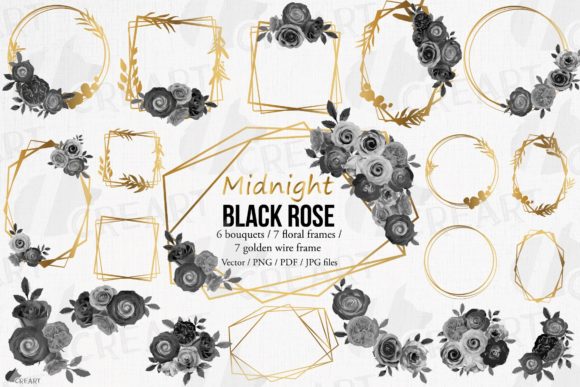
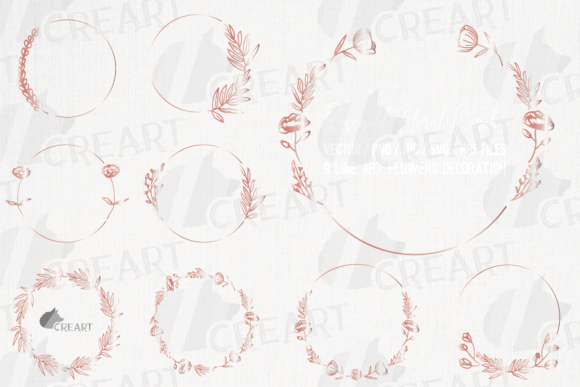
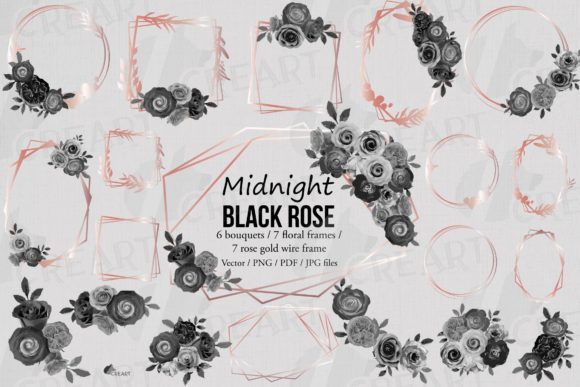
When you encounter a collection featuring watercolor grayscale rose decorations and wireframe structures, it is easy to focus solely on the visual appeal. Yet, the true value lies in the versatility of the package. A comprehensive set typically includes around 20 different design elements, ranging from seven distinct floral frames to various bouquets. Specifically, you might find four rose gold wire frames and three variations that integrate rose gold flowers directly into the structure. Alongside these, six watercolor floral bouquets provide the organic contrast needed to soften the geometric lines of the frames.
The mistake many beginners make is assuming all "digital downloads" are created equal. Some packs offer only low-resolution JPEGs suitable for web use but disastrous for print. If you attempt to scale a small image up for a large floral wall decor installation or a full-wrap tumbler design, the result will be blurry and unprofessional. To avoid this, you must verify that the pack includes high-resolution PNG files with transparent backgrounds. Transparency is crucial; it allows you to place individual clip art on any color or background you like without unsightly white boxes surrounding your roses.
Navigating File Formats: Avoiding the Compatibility Trap
One of the most frequent errors creators make is downloading a pack only to realize they cannot edit the colors or separate the layers. You might love the black and white floral bridal templates, but what if your client wants the roses in a deep burgundy or the frames in silver? If the files are flattened images, you are stuck. This limitation affects your efficiency and forces you to recreate designs from scratch, costing you time and money.
To prevent this, always look for a package that provides vector formats. A robust collection should include SVG files, which are scalable without any quality loss, making them perfect for cutting machines used in scrapbooking or sticker creation. Additionally, having access to an AI file (Adobe Illustrator) or an EPS file compatible with Corel Draw is essential for professionals who need to manipulate anchor points and change colors effortlessly. Even if you primarily use Photoshop, a layered PSD file is invaluable for adjusting the depth and texture of watercolor elements.
Consider a scenario where you are creating gift tags for a wedding. If you only have JPG files, you cannot easily remove the background to place the rose on a kraft paper tag. However, with the right vector and layered files, you can recolor the rose gold elements to match the bride's specific metallic theme and export a crisp PDF for printing. This flexibility is what separates a basic download from a professional-grade asset pack.
Application Mistakes and How to Correct Them
Even with the right files, application errors can occur. A common oversight involves the use of these elements on dark versus light surfaces. While black rose bouquets naturally pop against light backgrounds, using them on dark clothing or black tumblers requires careful consideration of contrast. Without proper layering or the addition of a subtle outline (which you can create if you have vector files), the black petals may disappear into the product color.
Furthermore, when using these designs for sublimation, remember that the "rose gold" effect in a digital file is often a flat color or a gradient simulation. It will not magically turn into metallic foil unless you are using specific printable vinyl or foil transfer methods. Expecting the ink alone to produce a shiny metallic finish on a mug is a misunderstanding of the sublimation process. The solution is to use these designs as the base art and pair them with actual metallic substrates or foiling techniques if a true shine is required.
Another area where creators stumble is licensing. Just because you purchased a pack does not always mean you can use it for unlimited commercial goods. Always check the license agreement regarding the number of physical items you can sell. For entrepreneurs marketing promotion materials or selling T-shirts, ensuring you have the correct commercial license prevents legal issues down the road.
Maximizing Versatility Across Projects
The beauty of a well-curated set of Black Rose Bouquets and Rose Gold Frames is its adaptability. These elements are not limited to wedding decor. Think about the branding for a gothic-inspired bakery, where watercolor grayscale roses could adorn packaging, or a tech startup looking for a sleek, modern logo using the wireframe aesthetics. The key is to mix and match the 20 provided elements creatively.
For educators and bloggers, these graphics can elevate presentation slides or eBook covers, adding a touch of sophistication that generic stock photos lack. When designing for web use, utilize the SVGs to ensure fast loading times and crisp display on high-DPI screens. For physical crafts like scrapbooking, the high-resolution PNGs ensure that even small cutouts retain their delicate watercolor textures.
Final Checklist Before You Download
Before finalizing your purchase or starting your project, take a moment to evaluate the package contents against your needs. Ensure the download includes:
- 20 High-Resolution PNGs with transparent backgrounds for immediate use in digital layouts.
- Vector Files (SVG, AI, EPS) to guarantee scalability for large format prints like floral walls.
- Layered Source Files (PSD) for maximum editing control in Photoshop.
- PDF Previews to easily view the entire collection without opening individual files.
Also, confirm that the final purchased items will be free of watermarks, logos, or paper textures that sometimes appear in preview images. A clean file is the foundation of a professional result. By paying attention to these details, you transform a simple download into a powerful tool for your creative arsenal. Whether you are dressing up invitations, creating custom stickers, or designing a full wedding suite, the right preparation ensures your vision translates perfectly from screen to reality.
In conclusion, the allure of midnight black roses and rose gold accents is undeniable, but the execution determines the success of your project. By avoiding the traps of low-resolution files, understanding the limitations of sublimation colors, and leveraging the power of vector editing, you can create stunning, high-quality work that resonates with your audience. Embrace the dramatic contrast these elements offer, but do so with the technical knowledge to back up your creativity.