Cyane: Modern Teams Management UI Kit
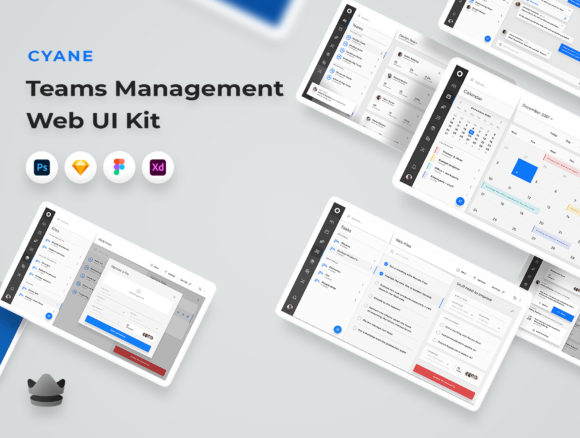
Building a functional team management dashboard is often where great product ideas stall. You have the logic mapped out, the database structured, and the user flows defined, but the visual interface remains a blank canvas. This is the friction point where Cyane - Teams Management Web UI Kit steps in to bridge the gap between concept and execution. Designed by Royalz Store, this isn't just a collection of static images; it is a comprehensive foundation for creating elegant, modern admin interfaces that feel professional right out of the box.
At its core, Cyane offers 32 beautifully designed screens tailored specifically for managing teams within web applications. What makes it particularly interesting for designers and developers alike is its dual nature: it provides immediate structure while remaining highly adaptable. Whether you are a freelancer rushing to meet a client deadline or an entrepreneur prototyping your next SaaS venture, having a pre-built system of 200 elements saves countless hours of reinventing the wheel.
Why Structure Matters in Admin Design
Admin panels and team management interfaces suffer from a unique design challenge: they must handle dense data without overwhelming the user. Clutter is the enemy of productivity. Cyane addresses this by prioritizing organization and clarity. The kit comes with well-layered, vector-based files that ensure every element scales perfectly, whether viewed on a standard laptop or a high-resolution Retina display.
The inclusion of both dark and light modes is a critical feature for modern web applications. Users today expect flexibility in how they interact with software, especially if they spend long hours monitoring metrics or managing personnel. By providing both themes, Cyane allows you to cater to user preference immediately, enhancing accessibility and reducing eye strain. This attention to detail signals to your end-users that the application was built with care.
Adapting Cyane for Different Industries
While labeled as a "teams management" kit, the versatility of these 32 screens extends far beyond simple HR tools. The clean, neutral aesthetic allows creators to reinterpret the components for various sectors. Here is how different professionals can leverage this kit:
- Agencies and Consultancies: Use the dashboard views to track project timelines, assign tasks to creative teams, and monitor billable hours. The organized layers make it easy to swap out generic icons for industry-specific branding.
- Educational Platforms: Adapt the user profile screens to represent student progress or faculty management. The data visualization elements can be repurposed to show grading trends or attendance records.
- Healthcare Administrators: With some color customization, the clean layout works well for scheduling staff shifts or managing patient intake teams, provided HIPAA-compliant data handling is implemented on the backend.
- Remote Work Startups: For companies operating entirely online, the interface can serve as a central hub for culture building, showing team availability, time zones, and collaborative spaces.
The key to successful adaptation lies in the customizable nature of the files. Compatible with Figma, XD, Sketch, and Photoshop, Cyane ensures that regardless of your preferred design tool, you can dive in immediately. You aren't locked into a specific workflow; instead, you have the freedom to modify fonts, colors, and shapes to align with your brand identity.
Practical Applications for Freelancers and Small Businesses
For freelancers and small business owners, time is the most valuable currency. Developing a custom UI from scratch can take weeks. Cyane compresses that timeline into days or even hours. Imagine a marketing consultant who needs to provide a client portal for their team to upload assets and review campaigns. Instead of coding a basic table view, they can utilize Cyane's pre-designed list views and filter options to create a polished experience that instills confidence in the client.
Furthermore, the screen main size of 2732x1536px ensures that you are designing for high-fidelity contexts. This resolution accommodates complex layouts and provides ample space for sidebars, navigation menus, and data-rich content areas without feeling cramped. When you present a prototype built on this framework, stakeholders can visualize the final product more clearly, leading to faster approval cycles.
Maintaining Consistency and Originality
Using a UI kit does not mean your final product must look like everyone else's. The danger of templates is homogenization, but Cyane mitigates this through its modular approach. To keep your results original:
- Rethink the Color Palette: While the default styles are elegant, do not hesitate to apply your brand's primary colors to action buttons and active states. This simple shift changes the entire emotional tone of the interface.
- Customize Typography: Swap the default fonts for a typeface that matches your brand voice. A tech startup might choose a geometric sans-serif, while a creative studio might opt for something with more character.
- Mix and Match Components: Take a header from one screen and combine it with a data card from another. The 200 included elements are designed to work together, but they also offer enough flexibility to create unique combinations.
- Add Micro-interactions: Once you export your designs to development, add subtle hover states and transitions. These small details elevate a static template into a dynamic application.
Consistency is achieved by sticking to the grid and spacing rules established in the kit. Because the files are organized, you can easily identify global styles and update them across all 32 screens simultaneously. This ensures that if you decide to change the border radius of a card or the shadow depth of a modal, the change propagates throughout the entire design system, maintaining a cohesive look and feel.
From Prototype to Production
The journey from a UI kit to a live application requires a mindset shift from decoration to functionality. Cyane supports this transition by providing vector shapes and organized layers. Developers appreciate clean handoffs, and the structured nature of these files reduces ambiguity during the coding phase. When a developer sees a well-named layer group in Figma or Sketch, they spend less time guessing and more time building robust features.
For educators and hobbyists exploring UI design, Cyane serves as an excellent learning resource. Studying how the screens are constructed reveals best practices in information architecture. You can analyze how the designers handled empty states, error messages, and data density. Reverse-engineering these decisions helps build a stronger foundational understanding of what makes an interface usable.
Ultimately, the value of Cyane - Teams Management Web UI Kit lies in its ability to accelerate creativity rather than restrict it. It removes the tedious groundwork of drawing rectangles and aligning pixels, freeing you to focus on solving real user problems. Whether you are launching a new platform, redesigning an internal tool, or simply seeking inspiration for your next project, this kit provides the solid ground needed to build something remarkable.
By leveraging these 32 screens and 200 elements, you are not just saving time; you are investing in a higher standard of quality. The result is an interface that feels intentional, polished, and ready for the demands of modern web users. In a digital landscape where first impressions matter, starting with a strong foundation like Cyane can be the difference between a project that stalls and one that succeeds.